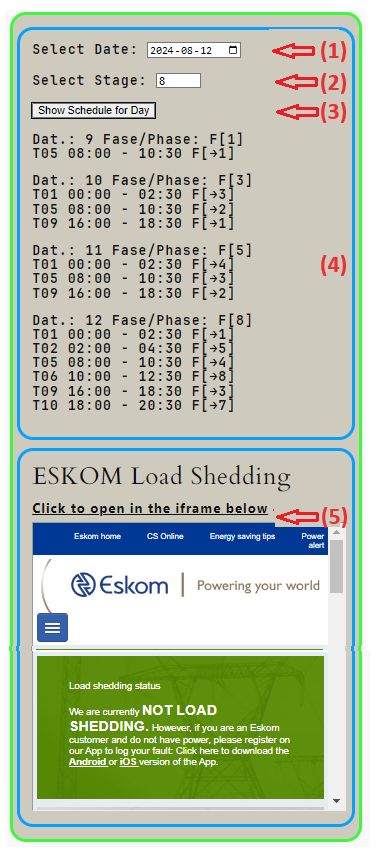
How this website app be used… Hoe die web-toep benut kan word.
(1) Klik op die datum blokkie en kies ‘n datum.
Click on the date selector and select a date.
(2) Klik op die fase blokkie en kies ‘n syfer 1 – 8.
Click on the stage selector and type 1 … 8
(3) Klik op___:
Click on______: “Show Schedule for the Day”.
Click on the area below, to find the current stage applied. Klik op die area hieronder vir die huidige fase van toepassing.
The featured image shows how the information is displayed. NOTE: the load shedding schedule is cumulative. If stage 5 is selected, then the time slots for stages 1 to 5 should be read together.
Searching for a urgent number on the the three Emergency pages? Op soek na ‘n nommer op die nood Bladsye?
(1) Onthou dat nommers kan sonder kennisgewing verander. Gebruik u eie diskresie as u nie regkom nie.
(2) Die inligting op die Bellville gifinligting sentrum, het ‘n skakel na ‘n pdf lêer wat u kan aflaai en druk. Dit bly altyd noodsaaklik dat u na die naaste hospitaal sou gaan. Die pdf is handig om nie verdere skade aan te rig nie.


Leave a Reply to Gabriela2165 Cancel reply